Start it from chat with !pomostart and your viewers focus with you.
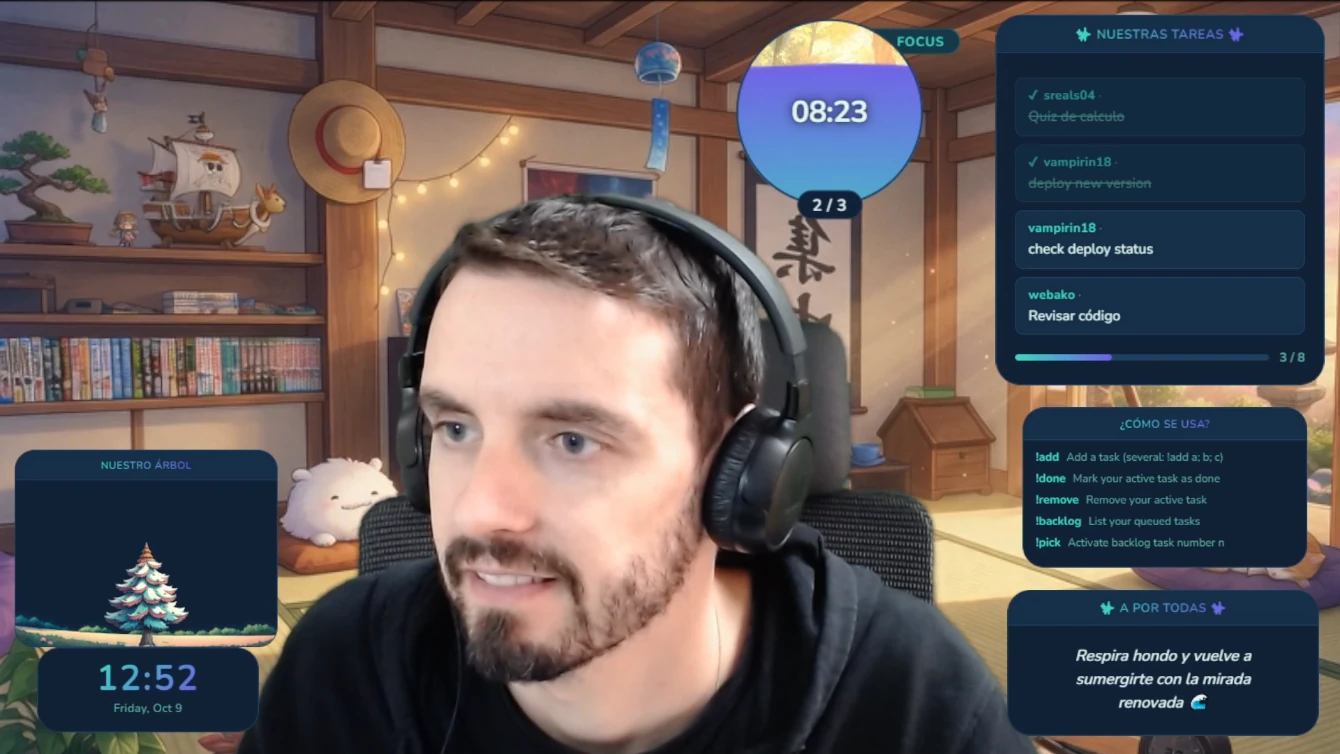
A water orb fills during focus and drains on breaks, right on your stream.
14-day free trial ยท no card required
Sakura palette ยท card
You and your moderators control the pomodoro from Twitch chat. The bot announces every focus and break, so viewers who just arrived know what's going on.
| Command | What it does | Example |
|---|---|---|
!pomostart | Start the first focus session. Add minutes to make it a different length. | !pomostart 50 |
!pomonext | Skip to the next phase (focus โ break โ focusโฆ), optionally with its own length. | !pomonext 15 |
!pomoadd | Add minutes to the current focus or break. | !pomoadd 5 |
!pomoset | Set focus / break minutes and the number of sessions. | !pomoset 25/5 4 |
!pomoauto!pomomanual | Phases advance on their own, or only when you type !pomonext. | !pomoauto |
!pomoreset | Stop and go back to focus session 1, e.g. after testing before going live. | !pomoreset |
!pomohelp | Anyone in chat: shows the pomodoro commands. | !pomohelp |
Sign in with your Twitch account and turn on the chat bot. No passwords, no downloads.
In OBS: Sources โ + โ Browser. Paste your pomodoro URL from the dashboard and set the size it shows (e.g. 320 ร 310).
The timer starts on stream and the bot tells your chat. Settings you change in the dashboard reach OBS on their own.
The time lives on our server, not in OBS: reload the source, switch scenes or open it on a second PC and it shows the same second.
A soft chime when a phase ends, and the bot tells your chat when focus or a break starts. Every message is yours to rewrite.
Rain, fireplace, ocean, forest, train and more, played from the timer with !setsound.
Cozy palettes, three sizes and a transparent mode, with a live preview in the dashboard before it goes on stream.
On Premium, a tree grows during each focus session and animals walk by when your chat finishes tasks.
Already have a bot for your chat's tasks? Keep it: companion mode keeps Cozy quiet on task commands.
Add the tree widget next to your timer: a seed falls when the focus session starts and the tree grows with every minute of focus. When a viewer finishes a task with !done, an animal runs by with their name.

Sign in with your Twitch account, copy the pomodoro widget URL from the dashboard (Add to OBS) and add it to OBS as a Browser Source with the size shown next to it. Then type !pomostart in your chat and the timer starts on stream.
Yes. The pomodoro timer is a browser source, so it works in OBS Studio, Streamlabs Desktop and any streaming software that supports browser sources.
Yes. You and your moderators can start, skip, extend or reset the timer from chat (!pomostart, !pomonext, !pomoadd, !pomoreset). Viewers see the timer on stream and can check the commands with !pomohelp.
Yes. Use !pomoset 50/10 3 for three 50-minute focus sessions with 10-minute breaks, or set the defaults in the dashboard. !pomostart 90 makes a single focus session longer.
Yes. The timer runs on our server, not in OBS, so reloading the browser source, switching scenes or opening the widget on a second computer shows the same time.
Every plan includes the pomodoro timer, and every plan starts with a 14-day free trial with no card required. If you don't add a payment method, the trial simply ends.
Yes. Turn on companion mode and Cozy stays quiet on task commands, so your viewers keep the bot they know while you use the pomodoro timer and the other widgets.
Try the pomodoro timer and every other widget free for 14 days. No card required.
Start your free trial